



What are the functions of the given options marked as  and
and  (appears when Handout Master view is active) represent?
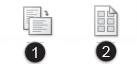
| A | – Helps you to set the number of slides of your choice to be displayed on each handout page
– Switch the slide orientation between Portrait and Landscape |
| B | – Switch the slide orientation between Portrait and Landscape
– Helps you to set the number of slides of your choice to be displayed on each handout page |
| C | – Show the page set up dialog box
– Show the themes dialog box |
| D | – Show the themes dialog box
– Show the page set up dialog box |
WHY IS THIS IN MS WORD 2010????ITS SUPPOSED TO BE IN MS POWERPOINT 2010